Robot Model Tips
Loading the Robot Model Without Mesh Data
Sometimes, loading a robot model with full mesh data can be slow and resource-intensive. If mesh data is not necessary for your use case, you can improve the loading speed by disabling mesh data loading as shown below:
from datetime import datetime

from skrobot.models import PR2
from skrobot.utils.urdf import no_mesh_load_mode

start = datetime.now()
robot_no_mesh = PR2()
end = datetime.now()
print(end - start)
# 0:00:00.269310

# Load the PR2 model without mesh data for faster initialization
start = datetime.now()
with no_mesh_load_mode():
    robot_no_mesh = PR2()
end = datetime.now()
print(end - start)
# 0:00:00.083222
This approach is useful when you only need the basic structure of the robot without the visual details of the mesh, which can be beneficial in scenarios where performance is prioritized over graphical fidelity.
Inverse Kinematics
Inverse kinematics (IK) is the process of calculating joint angles required to position the robot’s end-effector at a desired pose in Cartesian space. Scikit-robot provides both single-pose and batch inverse kinematics solvers with comprehensive constraint support.
Basic Inverse Kinematics
The basic inverse kinematics solver finds joint angles to reach a target pose:
import numpy as np
from skrobot.coordinates import Coordinates
from skrobot.models import PR2

# Initialize robot and set up target
robot = PR2()
robot.reset_pose()

# Define target pose
target_coords = Coordinates(
    pos=[0.8, -0.3, 0.8],
    rot=[0.0, np.deg2rad(30), np.deg2rad(-30)]
)

# Solve inverse kinematics
link_list = robot.rarm.link_list
result = robot.inverse_kinematics(
    target_coords,
    link_list=link_list,
    move_target=robot.rarm.end_coords,
    rotation_mask=True,
    position_mask=True,
    stop=100,              # Maximum iterations
    thre=0.001,           # Position threshold (meters)
    rthre=np.deg2rad(1.0) # Rotation threshold (radians)
)

if result is not False:
    print("IK solved successfully!")
    print("Joint angles:", robot.angle_vector())
else:
    print("IK failed to converge")
Batch Inverse Kinematics
For multiple target poses, batch IK provides significant performance improvements:
from skrobot.coordinates import Coordinates
from skrobot.models import Fetch

robot = Fetch()
robot.reset_pose()

# Define multiple target poses
target_poses = [
    Coordinates(pos=[0.7, -0.2, 0.9]).rotate(np.deg2rad(30), 'y'),
    Coordinates(pos=[0.6, -0.3, 1.0]).rotate(np.deg2rad(-25), 'z'),
    Coordinates(pos=[0.8, -0.1, 0.8]).rotate(np.deg2rad(45), 'x'),
]

# Solve batch inverse kinematics
link_list = robot.rarm.link_list
solutions, success_flags, attempt_counts = robot.batch_inverse_kinematics(
    target_poses,
    link_list=link_list,
    move_target=robot.rarm.end_coords,
    rotation_mask=True,
    position_mask=True,
    stop=100,
    thre=0.001,
    rthre=np.deg2rad(1.0),
    attempts_per_pose=50  # Multiple attempts with random initial poses
)

# Check results
for i, (solution, success, attempts) in enumerate(zip(solutions, success_flags, attempt_counts)):
    if success:
        print(f"Pose {i}: Solved in {attempts} attempts")
        robot.angle_vector(solution)  # Apply solution
    else:
        print(f"Pose {i}: Failed after {attempts} attempts")
Axis Constraints
The position_mask and rotation_mask parameters provide fine-grained control over which degrees of freedom are constrained during IK solving. The mask specifies which axes to constrain (1=constrained, 0=free).
Position Mask Constraints
Controls which positional degrees of freedom are constrained:
# Full 3D position constraint (default)
robot.inverse_kinematics(target, position_mask=True)

# No position constraints - ignore position
robot.inverse_kinematics(target, position_mask=False)

# Constrain only specific axes
robot.inverse_kinematics(target, position_mask='z')    # Only Z (height)
robot.inverse_kinematics(target, position_mask='xy')   # Only X and Y (planar)
robot.inverse_kinematics(target, position_mask='xz')   # X and Z only
Supported position mask values:
True: Constrain all position axes (X, Y, Z)FalseorNone: No position constraint'x','y','z': Constrain only the specified axis'xy','yz','xz': Constrain the two specified axes[1, 0, 1]: Direct mask specification (constrain X and Z)
Rotation Mask Constraints
Controls which rotational degrees of freedom are constrained. The two-axis masks are most useful as they preserve one axis direction while allowing rotation around it.
# Full 3D rotation constraint (default)
robot.inverse_kinematics(target, rotation_mask=True)

# No rotation constraints - ignore orientation
robot.inverse_kinematics(target, rotation_mask=False)

# Two-axis constraints (recommended for partial rotation control)
robot.inverse_kinematics(target, rotation_mask='yz')   # X-axis direction preserved
robot.inverse_kinematics(target, rotation_mask='xz')   # Y-axis direction preserved
robot.inverse_kinematics(target, rotation_mask='xy')   # Z-axis direction preserved
Supported rotation mask values:
True: Constrain all rotation axes (full orientation match)FalseorNone: No rotation constraint (orientation free)'xy','yz','xz': Constrain two rotation axes, preserving the third axis direction[1, 1, 0]: Direct mask specification (same as'xy')
Mirror Mode (rotation_mirror)
The rotation_mirror parameter allows the solver to consider both positive and negative directions of a specific axis, choosing the orientation that results in the shortest rotation path:
# Allow X-axis to flip direction if closer
robot.inverse_kinematics(target, rotation_mask=True, rotation_mirror='x')

# Allow Y-axis to flip direction if closer
robot.inverse_kinematics(target, rotation_mask=True, rotation_mirror='y')

# Allow Z-axis to flip direction if closer
robot.inverse_kinematics(target, rotation_mask=True, rotation_mirror='z')
Backwards Compatibility (Legacy API)
The legacy rotation_axis and translation_axis parameters are still supported for backwards compatibility. They are automatically converted to the new mask format internally.
Important semantic difference:
Legacy API specifies axes to ignore (free axes)
New API specifies axes to constrain (fixed axes)
Conversion table (rotation):
Legacy (rotation_axis) |
New (rotation_mask) |
Effect |
|---|---|---|
|
|
Full rotation constraint |
|
|
No rotation constraint |
|
|
X-axis direction preserved |
|
|
Y-axis direction preserved |
|
|
Z-axis direction preserved |
Example:
# These are equivalent - Y-axis direction preserved:
robot.inverse_kinematics(target, rotation_axis='y')    # Legacy: ignore Y
robot.inverse_kinematics(target, rotation_mask='xz')   # New: constrain X,Z

# These are equivalent - Z-axis direction preserved:
robot.inverse_kinematics(target, rotation_axis='z')    # Legacy: ignore Z
robot.inverse_kinematics(target, rotation_mask='xy')   # New: constrain X,Y
Visual Examples of Axis Constraints
The following images demonstrate how different axis constraints affect the robot’s inverse kinematics solutions using the Fetch robot.
Basic Control Modes
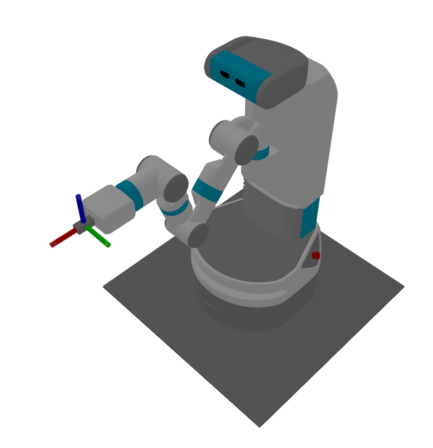
Full 6-DOF Control
rotation_mask=True, position_mask=True
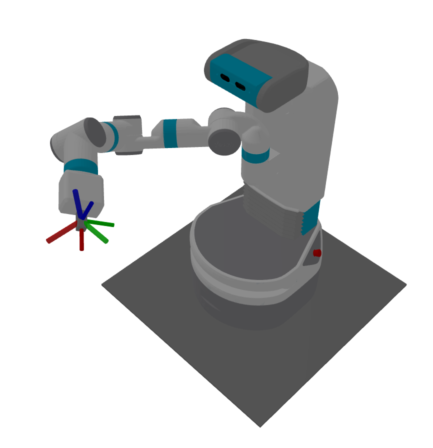
Position Only (No Orientation)
rotation_mask=False, position_mask=True
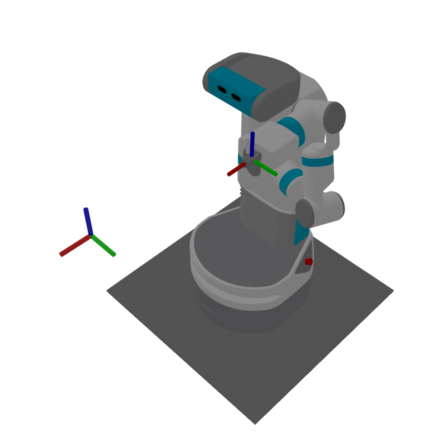
Orientation Only (No Position)
rotation_mask=True, position_mask=False
Partial Rotation Constraints
These examples show IK with one axis direction preserved by constraining two rotation components.
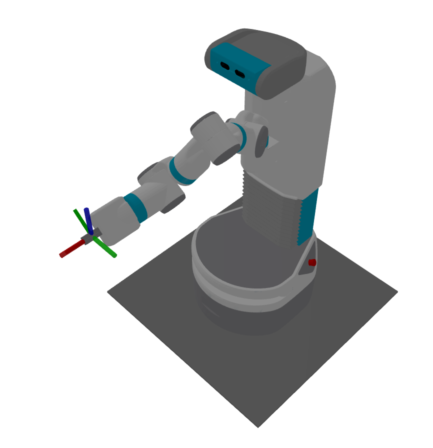
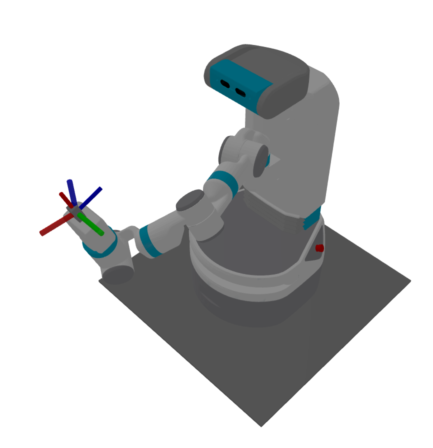
X-axis Direction Preserved
New: rotation_mask='yz' / Legacy: rotation_axis='x'
X-axis direction matches target, rotation around X is free.
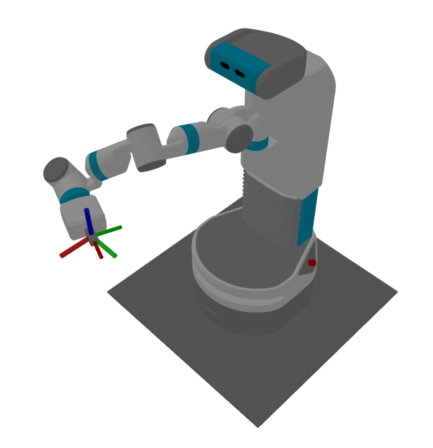
Y-axis Direction Preserved
New: rotation_mask='xz' / Legacy: rotation_axis='y'
Y-axis direction matches target, rotation around Y is free.
Z-axis Direction Preserved
New: rotation_mask='xy' / Legacy: rotation_axis='z'
Z-axis direction matches target, rotation around Z is free.
Mirror Notation (Axis Flip Optimization)
The mirror notation allows the solver to consider both positive and negative directions of a specific axis, choosing the orientation that results in the shortest rotation path:
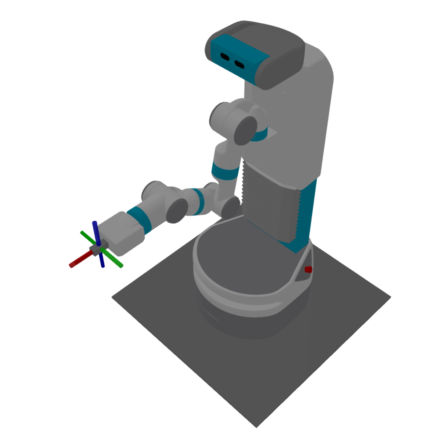
X-mirror (Optimized X-axis Orientation)
rotation_mask=True, rotation_mirror='x', position_mask=True
Considers both +X and -X directions, chooses nearest
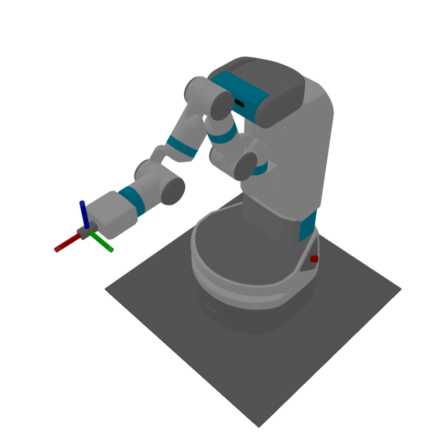
Y-mirror (Optimized Y-axis Orientation)
rotation_mask=True, rotation_mirror='y', position_mask=True
Considers both +Y and -Y directions, chooses nearest
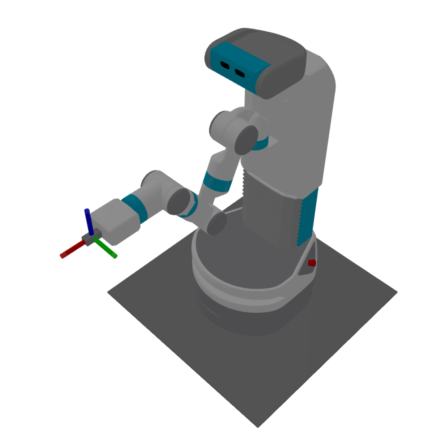
Z-mirror (Optimized Z-axis Orientation)
rotation_mask=True, rotation_mirror='z', position_mask=True
Considers both +Z and -Z directions, chooses nearest
Practical Examples with Constraints
from skrobot.coordinates import Coordinates
from skrobot.models import Fetch

# Initialize robot
robot = Fetch()
robot.reset_pose()

# Define target pose
target = Coordinates(pos=[0.7, 0.0, 1.0])

# Setup link list and move target for all examples
link_list = robot.rarm.link_list
move_target = robot.rarm.end_coords

# Position-only IK (ignore orientation)
robot.inverse_kinematics(
    target,
    link_list=link_list,
    move_target=move_target,
    position_mask=True,
    rotation_mask=False
)

# Orientation-only IK (ignore position)
robot.reset_pose()
robot.inverse_kinematics(
    target,
    link_list=link_list,
    move_target=move_target,
    position_mask=False,
    rotation_mask=True
)

# Planar motion (XY plane) with roll/pitch control
robot.reset_pose()
robot.inverse_kinematics(
    target,
    link_list=link_list,
    move_target=move_target,
    position_mask='xy',
    rotation_mask='xy'
)

# Vertical motion with yaw control
robot.reset_pose()
robot.inverse_kinematics(
    target,
    link_list=link_list,
    move_target=move_target,
    position_mask='z',
    rotation_mask='z'
)
Advanced Features
Multiple Attempts for Robust Solving
When using batch IK, you can specify multiple attempts per pose to improve success rates:
from skrobot.coordinates import Coordinates
from skrobot.models import Fetch
import numpy as np

# Initialize robot
robot = Fetch()
robot.reset_pose()

# Define multiple target poses
target_poses = [
    Coordinates(pos=[0.7, 0.0, 1.0]),
    Coordinates(pos=[0.6, 0.2, 0.9]),
    Coordinates(pos=[0.8, -0.1, 1.1]),
]

# Setup parameters
link_list = robot.rarm.link_list
move_target = robot.rarm.end_coords

# Batch IK with multiple attempts
solutions, success_flags, attempt_counts = robot.batch_inverse_kinematics(
    target_poses,
    link_list=link_list,
    move_target=move_target,
    attempts_per_pose=50,           # Try up to 50 different initial poses
)
Custom Convergence Thresholds
Adjust precision requirements based on your application:
from skrobot.coordinates import Coordinates
from skrobot.models import Fetch
import numpy as np

# Initialize robot
robot = Fetch()
robot.reset_pose()

# Define target pose
target = Coordinates(pos=[0.7, 0.0, 1.0])

# Setup parameters
link_list = robot.rarm.link_list
move_target = robot.rarm.end_coords

# High precision for precise manipulation
robot.inverse_kinematics(
    target,
    link_list=link_list,
    move_target=move_target,
    thre=0.0001,           # 0.1mm position tolerance
    rthre=np.deg2rad(0.1)  # 0.1 degree rotation tolerance
)

# Lower precision for faster solving
robot.reset_pose()
robot.inverse_kinematics(
    target,
    link_list=link_list,
    move_target=move_target,
    thre=0.01,             # 1cm position tolerance
    rthre=np.deg2rad(5.0)  # 5 degree rotation tolerance
)
Performance Considerations
Batch vs Sequential: Use
batch_inverse_kinematicsfor multiple poses - it’s significantly faster than callinginverse_kinematicsin a loop.Constraint Selection: More constraints generally lead to faster convergence. If you don’t need full 6-DOF control, specify appropriate axis constraints.
Initial Poses: For difficult IK problems, use multiple attempts with
attempts_per_pose> 1.Iteration Limits: Adjust
stopparameter based on complexity - simple poses may solve in 10-20 iterations, while complex poses may need 100+.
Common Patterns
from skrobot.coordinates import Coordinates
from skrobot.models import Fetch
import numpy as np

# Initialize robot
robot = Fetch()
robot.reset_pose()

# Setup parameters
link_list = robot.rarm.link_list
move_target = robot.rarm.end_coords

# Pick and place operations - position with yaw control
pick_poses = [
    Coordinates(pos=[0.5, 0.2, 0.8]),
    Coordinates(pos=[0.6, 0.1, 0.7]),
]

solutions, success_flags, attempt_counts = robot.batch_inverse_kinematics(
    pick_poses,
    link_list=link_list,
    move_target=move_target,
    position_mask=True,
    rotation_mask='z',  # Only control yaw for grasping
    attempts_per_pose=20
)

# Painting/welding - orientation-critical operations
paint_poses = [
    Coordinates(pos=[0.5, 0.0, 0.8], rot=[0, np.pi/2, 0]),
    Coordinates(pos=[0.6, 0.0, 0.8], rot=[0, np.pi/2, 0]),
]

solutions, success_flags, attempt_counts = robot.batch_inverse_kinematics(
    paint_poses,
    link_list=link_list,
    move_target=move_target,
    position_mask=True,
    rotation_mask=True,  # Full orientation control
    thre=0.001,          # High precision
    rthre=np.deg2rad(1.0),
    attempts_per_pose=20
)